DeepEval: The Open-Source LLM Evaluation Framework
本文为开源社区精选内容,由 confident-ai 原创。 文中链接将跳转到原始仓库,部分图片可能加载较慢。
查看原始来源AI 导读
The LLM Evaluation Framework Documentation | Metrics and Features | Getting Started | Integrations | DeepEval Platform DeepEval is a simple-to-use, open-source LLM evaluation framework, for...

The LLM Evaluation Framework
Documentation | Metrics and Features | Getting Started | Integrations | DeepEval Platform

DeepEval is a simple-to-use, open-source LLM evaluation framework, for evaluating and testing large-language model systems. It is similar to Pytest but specialized for unit testing LLM outputs. DeepEval incorporates the latest research to evaluate LLM outputs based on metrics such as G-Eval, task completion, answer relevancy, hallucination, etc., which uses LLM-as-a-judge and other NLP models that run locally on your machine for evaluation.
Whether your LLM applications are AI agents, RAG pipelines, or chatbots, implemented via LangChain or OpenAI, DeepEval has you covered. With it, you can easily determine the optimal models, prompts, and architecture to improve your RAG pipeline, agentic workflows, prevent prompt drifting, or even transition from OpenAI to hosting your own Deepseek R1 with confidence.
[!IMPORTANT] Need a place for your DeepEval testing data to live 🏡❤️? Sign up to the DeepEval platform to compare iterations of your LLM app, generate & share testing reports, and more.
Want to talk LLM evaluation, need help picking metrics, or just to say hi? Come join our discord.
🔥 Metrics and Features
🥳 You can now share DeepEval's test results on the cloud directly on Confident AI
- Supports both end-to-end and component-level LLM evaluation.
- Large variety of ready-to-use LLM evaluation metrics (all with explanations) powered by ANY LLM of your choice, statistical methods, or NLP models that run locally on your machine:
- G-Eval
大量即用型 LLM 评估指标(均带有解释),由您选择的任何 LLM、统计方法或在您机器上本地运行的 NLP 模型提供支持: G-Eval (G-Eval) - DAG (deep acyclic graph)
- RAG metrics:
- Answer Relevancy
RAG 指标: 答案相关性 (Answer Relevancy) - Faithfulness
- Contextual Recall
- Contextual Precision
- Contextual Relevancy
- RAGAS
- Task Completion
- Hallucination
- Knowledge Retention
- Toxicity
- MMLU
- Curate/annotate evaluation datasets on the cloud
[!NOTE] DeepEval is available on Confident AI, an LLM evals platform for AI observability and quality. Create an account here.
🔌 Integrations
- 🦄 LlamaIndex, to unit test RAG applications in CI/CD
- 🤗 Hugging Face, to enable real-time evaluations during LLM fine-tuning
🚀 QuickStart
Let's pretend your LLM application is a RAG based customer support chatbot; here's how DeepEval can help test what you've built.
Installation
Deepeval works with Python>=3.9+.
pip install -U deepeval
Create an account (highly recommended)
Using the deepeval platform will allow you to generate sharable testing reports on the cloud. It is free, takes no additional code to setup, and we highly recommend giving it a try.
To login, run:
deepeval login
Follow the instructions in the CLI to create an account, copy your API key, and paste it into the CLI. All test cases will automatically be logged (find more information on data privacy here).
Writing your first test case
Create a test file:
touch test_chatbot.py
Open test_chatbot.py and write your first test case to run an end-to-end evaluation using DeepEval, which treats your LLM app as a black-box:
import pytest
from deepeval import assert_test
from deepeval.metrics import GEval
from deepeval.test_case import LLMTestCase, LLMTestCaseParams

def test_case():
    correctness_metric = GEval(
        name="Correctness",
        criteria="Determine if the 'actual output' is correct based on the 'expected output'.",
        evaluation_params=[LLMTestCaseParams.ACTUAL_OUTPUT, LLMTestCaseParams.EXPECTED_OUTPUT],
        threshold=0.5
    )
    test_case = LLMTestCase(
        input="What if these shoes don't fit?",
        # Replace this with the actual output from your LLM application
        actual_output="You have 30 days to get a full refund at no extra cost.",
        expected_output="We offer a 30-day full refund at no extra costs.",
        retrieval_context=["All customers are eligible for a 30 day full refund at no extra costs."]
    )
    assert_test(test_case, [correctness_metric])
Set your OPENAI_API_KEY as an environment variable (you can also evaluate using your own custom model, for more details visit this part of our docs):
export OPENAI_API_KEY="..."
And finally, run test_chatbot.py in the CLI:
deepeval test run test_chatbot.py
Congratulations! Your test case should have passed ✅ Let's breakdown what happened.
- The variable
inputmimics a user input, andactual_outputis a placeholder for what your application's supposed to output based on this input. - The variable
expected_outputrepresents the ideal answer for a giveninput, andGEvalis a research-backed metric provided bydeepevalfor you to evaluate your LLM output's on any custom with human-like accuracy. - In this example, the metric
criteriais correctness of theactual_outputbased on the providedexpected_output. - All metric scores range from 0 - 1, which the
threshold=0.5threshold ultimately determines if your test have passed or not.
Read our documentation for more information on more options to run end-to-end evaluation, how to use additional metrics, create your own custom metrics, and tutorials on how to integrate with other tools like LangChain and LlamaIndex.
Evaluating Nested Components
If you wish to evaluate individual components within your LLM app, you need to run component-level evals - a powerful way to evaluate any component within an LLM system.
Simply trace "components" such as LLM calls, retrievers, tool calls, and agents within your LLM application using the @observe decorator to apply metrics on a component-level. Tracing with deepeval is non-instrusive (learn more here) and helps you avoid rewriting your codebase just for evals:
from deepeval.tracing import observe, update_current_span
from deepeval.test_case import LLMTestCase
from deepeval.dataset import Golden
from deepeval.metrics import GEval
from deepeval import evaluate

correctness = GEval(name="Correctness", criteria="Determine if the 'actual output' is correct based on the 'expected output'.", evaluation_params=[LLMTestCaseParams.ACTUAL_OUTPUT, LLMTestCaseParams.EXPECTED_OUTPUT])

@observe(metrics=[correctness])
def inner_component():
    # Component can be anything from an LLM call, retrieval, agent, tool use, etc.
    update_current_span(test_case=LLMTestCase(input="...", actual_output="..."))
    return

@observe
def llm_app(input: str):
    inner_component()
    return

evaluate(observed_callback=llm_app, goldens=[Golden(input="Hi!")])
You can learn everything about component-level evaluations here.
Evaluating Without Pytest Integration
Alternatively, you can evaluate without Pytest, which is more suited for a notebook environment.
from deepeval import evaluate
from deepeval.metrics import AnswerRelevancyMetric
from deepeval.test_case import LLMTestCase

answer_relevancy_metric = AnswerRelevancyMetric(threshold=0.7)
test_case = LLMTestCase(
    input="What if these shoes don't fit?",
    # Replace this with the actual output from your LLM application
    actual_output="We offer a 30-day full refund at no extra costs.",
    retrieval_context=["All customers are eligible for a 30 day full refund at no extra costs."]
)
evaluate([test_case], [answer_relevancy_metric])
Using Standalone Metrics
DeepEval is extremely modular, making it easy for anyone to use any of our metrics. Continuing from the previous example:
from deepeval.metrics import AnswerRelevancyMetric
from deepeval.test_case import LLMTestCase

answer_relevancy_metric = AnswerRelevancyMetric(threshold=0.7)
test_case = LLMTestCase(
    input="What if these shoes don't fit?",
    # Replace this with the actual output from your LLM application
    actual_output="We offer a 30-day full refund at no extra costs.",
    retrieval_context=["All customers are eligible for a 30 day full refund at no extra costs."]
)

answer_relevancy_metric.measure(test_case)
print(answer_relevancy_metric.score)
# All metrics also offer an explanation
print(answer_relevancy_metric.reason)
Note that some metrics are for RAG pipelines, while others are for fine-tuning. Make sure to use our docs to pick the right one for your use case.
Evaluating a Dataset / Test Cases in Bulk
In DeepEval, a dataset is simply a collection of test cases. Here is how you can evaluate these in bulk:
import pytest
from deepeval import assert_test
from deepeval.dataset import EvaluationDataset, Golden
from deepeval.metrics import AnswerRelevancyMetric
from deepeval.test_case import LLMTestCase

dataset = EvaluationDataset(goldens=[Golden(input="What's the weather like today?")])

for golden in dataset.goldens:
    test_case = LLMTestCase(
        input=golden.input,
        actual_output=your_llm_app(golden.input)
    )
    dataset.add_test_case(test_case)

@pytest.mark.parametrize(
    "test_case",
    dataset.test_cases,
)
def test_customer_chatbot(test_case: LLMTestCase):
    answer_relevancy_metric = AnswerRelevancyMetric(threshold=0.5)
    assert_test(test_case, [answer_relevancy_metric])
# Run this in the CLI, you can also add an optional -n flag to run tests in parallel
deepeval test run test_<filename>.py -n 4
Alternatively, although we recommend using deepeval test run, you can evaluate a dataset/test cases without using our Pytest integration:
from deepeval import evaluate
...

evaluate(dataset, [answer_relevancy_metric])
# or
dataset.evaluate([answer_relevancy_metric])
A Note on Env Variables (.env / .env.local)
DeepEval auto-loads .env.local then .env from the current working directory at import time.
Precedence: process env -> .env.local -> .env.
Opt out with DEEPEVAL_DISABLE_DOTENV=1.
cp .env.example .env.local
# then edit .env.local (ignored by git)
DeepEval With Confident AI
DeepEval is available on Confident AI, an evals & observability platform that allows you to:
- Curate/annotate evaluation datasets on the cloud
- Benchmark LLM app using dataset, and compare with previous iterations to experiment which models/prompts works best
- Fine-tune metrics for custom results
- Debug evaluation results via LLM traces
- Monitor & evaluate LLM responses in product to improve datasets with real-world data
- Repeat until perfection
Everything on Confident AI, including how to use Confident is available here.
To begin, login from the CLI:
deepeval login
Follow the instructions to log in, create your account, and paste your API key into the CLI.
Now, run your test file again:
deepeval test run test_chatbot.py
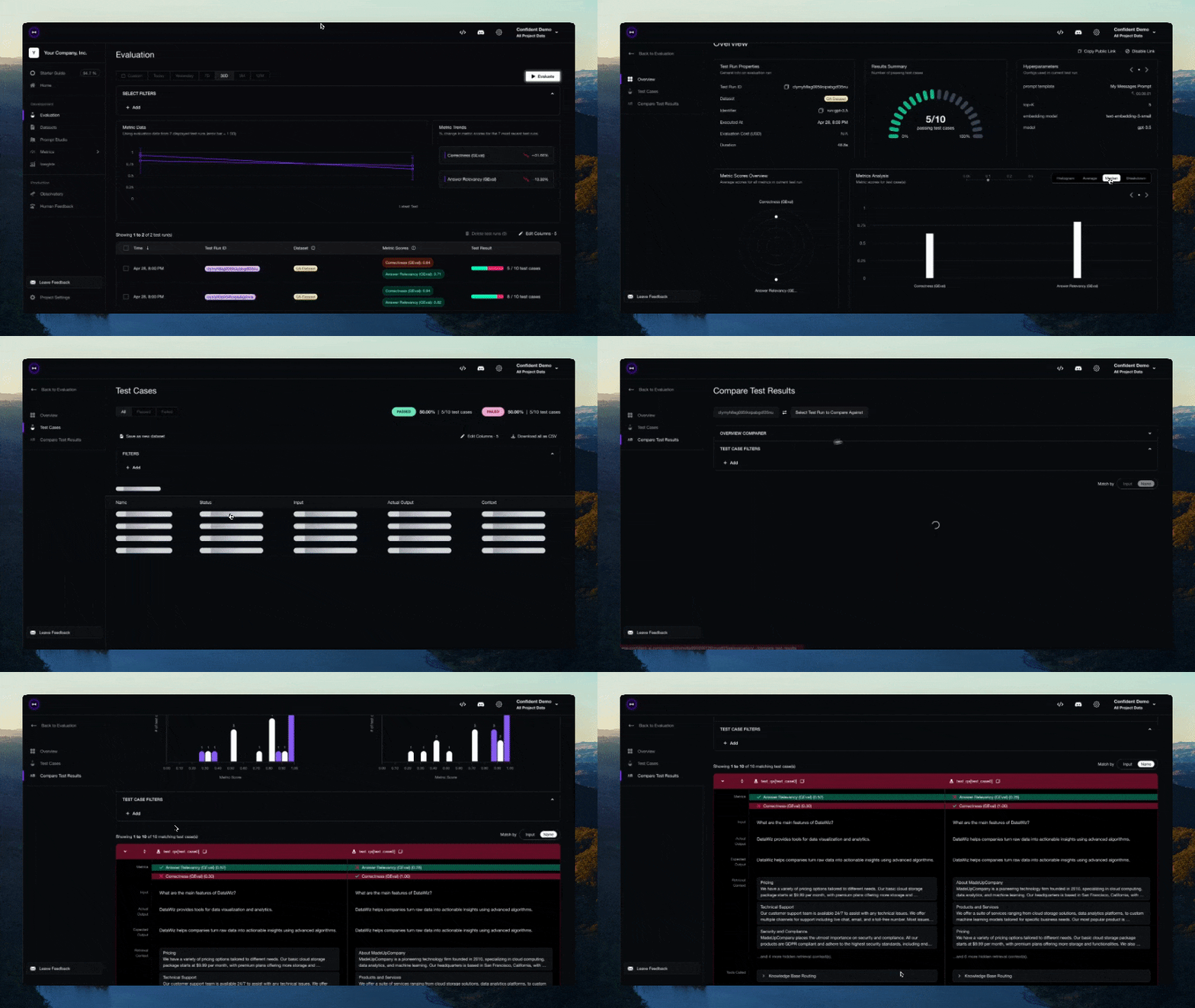
You should see a link displayed in the CLI once the test has finished running. Paste it into your browser to view the results!
Configuration
Environment variables via .env files
Using .env.local or .env is optional. If they are missing, DeepEval uses your existing environment variables. When present, dotenv environment variables are auto-loaded at import time (unless you set DEEPEVAL_DISABLE_DOTENV=1).
Precedence: process env -> .env.local -> .env
cp .env.example .env.local
# then edit .env.local (ignored by git)
Contributing
Please read CONTRIBUTING.md for details on our code of conduct, and the process for submitting pull requests to us.
Roadmap
Features:
- Integration with Confident AI
- Implement G-Eval
- Implement RAG metrics
- Implement Conversational metrics
- Evaluation Dataset Creation
- Red-Teaming
- DAG custom metrics
- Guardrails
Authors
Built by the founders of Confident AI. Contact [email protected] for all enquiries.
License
DeepEval is licensed under Apache 2.0 - see the LICENSE.md file for details.
深度加工(NotebookLM 生成)
基于本文内容生成的 PPT 大纲、博客摘要、短视频脚本与 Deep Dive 播客,用于多场景复用
PPT 大纲(5-8 张幻灯片) 点击展开
DeepEval: The Open-Source LLM Evaluation Framework — ppt
这是一份基于您提供的 DeepEval 文档生成的 PPT 大纲。大纲包含 6 张幻灯片,采用 Markdown 格式编写。
幻灯片 1:DeepEval 简介与核心定位
- 什么是 DeepEval:一个开源且易于使用的大语言模型(LLM)评估框架,专为评估和测试 LLM 系统而设计 [1]。
- 测试理念:它类似于软件开发中的 Pytest,但专门用于对 LLM 的输出进行单元测试 [1]。
- 适用场景广泛:无论是 AI 智能体(Agents)、检索增强生成(RAG)管道,还是基于 LangChain 或 OpenAI 构建的聊天机器人,都能全面覆盖 [1]。
- 灵活的评估引擎:融合最新研究,支持使用“LLM作为裁判(LLM-as-a-judge)”或在本地运行的其他 NLP 模型来进行评估 [1]。
幻灯片 2:核心评估指标体系
- RAG 专属指标:提供答案相关性(Answer Relevancy)、事实一致性(Faithfulness)、上下文召回率及精确度等现成指标 [2]。
- 智能体与对话指标:支持评估任务完成度、工具调用正确性,以及对话的完整性、知识保留度和角色遵循度 [2]。
- 安全与质量指标:能够有效检测模型输出的幻觉(Hallucination)、总结质量、偏见和毒性内容 [2]。
- 高度可定制:用户不仅可以利用任何自己选择的 LLM 来驱动评估,还能构建自动集成到 DeepEval 生态中的自定义指标 [2]。
幻灯片 3:灵活的测试与追踪模式
- 端到端黑盒测试:只需提供模拟输入(Input)和预期输出(Expected Output),即可通过设定的阈值(Threshold)直接评估 LLM 系统的整体表现 [3, 4]。
- 组件级精细评估:通过
@observe装饰器,可以非侵入式地追踪和评估应用内部的特定组件(如检索器、工具调用、单次 LLM 交互) [5, 6]。 - 无缝的环境兼容:除了标准的命令行运行(
deepeval test run),还支持在 Jupyter Notebook 等无 Pytest 环境中直接评估测试用例 [4, 6, 7]。 - 批量测试与数据集:支持将多个测试用例打包为评估数据集(EvaluationDataset),便于利用 Pytest 框架进行批量并发测试 [7, 8]。
幻灯片 4:红队测试与基准测试能力
- 自动红队测试(Red Teaming):仅需几行代码,即可扫描并发现 LLM 应用中 40 多种安全漏洞(如 SQL 注入、毒性内容等) [9]。
- 高级攻击模拟:利用提示词注入等 10 余种高级攻击增强策略,帮助开发者测试应用的鲁棒性 [9]。
- 主流基准测试(Benchmarking):通过不到 10 行代码,即可在 MMLU、HellaSwag、HumanEval、GSM8K 等知名学术基准上对任何 LLM 进行跑分 [9]。
- 生成合成数据:框架支持自动生成用于评估的合成数据集,大幅降低测试数据的人工标注成本 [9]。
幻灯片 5:平台级可观测性(Confident AI)
- 完整的评估生命周期:DeepEval 100% 集成到 Confident AI 云平台,覆盖了从数据集管理到生产监控的全流程 [9, 10]。
- 版本对比与实验:可以在云端使用数据集对 LLM 应用进行基准测试,并直观对比不同模型或提示词的迭代效果 [9, 10]。
- 生产环境监控:不仅能调试通过 LLM 追踪发现的问题,还能在产品实际运行中监控和评估 LLM 响应,利用真实数据不断改进系统 [9, 10]。
- 自动生成报告:测试完成后无需额外代码,即可在云端生成并分享详细的测试报告 [11]。
幻灯片 6:快速上手与生态集成
- 安装简便:支持 Python 3.9+,通过简单的
pip install -U deepeval即可完成安装 [11]。 - 丰富的框架集成:原生集成 LlamaIndex 以便在 CI/CD 中测试 RAG,同时支持 Hugging Face 实现微调时的实时评估 [11]。
- 环境变量管理:自动从当前目录加载
.env.local和.env文件以获取 API 密钥(如 OpenAI API),配置过程顺畅自然 [3, 10, 12]。 - CI/CD 无缝接入:作为轻量级框架,它可以无缝整合进各类 CI/CD 环境,为 LLM 应用构建可靠的自动化测试流水线 [9]。
博客摘要 + 核心看点 点击展开
DeepEval: The Open-Source LLM Evaluation Framework — summary
SEO 友好博客摘要:
DeepEval 是一款专为大语言模型(LLM)系统设计的开源评估框架,让开发者能像使用 Pytest 一样轻松进行 LLM 单元测试 [1]。它结合最新研究成果,利用本地 NLP 模型或“LLM 作为裁判(LLM-as-a-judge)”技术,对 RAG 管道、AI 智能体和聊天机器人进行高效评估 [1]。该框架内置了数十种开箱即用的指标(包含 G-Eval、答案相关性和幻觉检测等),全面支持端到端及模型内部组件级别的评估 [1, 2]。此外,DeepEval 能无缝集成 CI/CD 环境,支持针对提示词注入等超过 40 种安全漏洞的红队测试 [3]。配合 Confident AI 平台,开发者更可实现完整的评估与可观测性生命周期管理 [3]。
3 条核心看点:
- 丰富的评估指标:提供 G-Eval 及幻觉检测等现成指标,支持端到端与组件级系统测试 [1, 2]。
- 安全红队与基准测试:只需极少代码即可执行 40 多种安全漏洞测试及主流大模型基准评测 [3]。
- 强大的生态与云端集成:无缝对接 CI/CD,结合 Confident AI 平台实现完整的评估与可观测性管理 [3]。
60 秒短视频脚本 点击展开
DeepEval: The Open-Source LLM Evaluation Framework — video
这是一份基于您提供的 DeepEval 文档内容,为您定制的 60 秒短视频脚本。字数严格按照您的要求进行了控制:
【钩子开场】(12 字)
你的大模型输出真的靠谱吗?[1]
【核心解说 1】(25 字)
DeepEval 是一个开源大模型评估框架,类似 Pytest,专用于输出的单元测试。[1]
【核心解说 2】(26 字)
它内置幻觉和相关性等指标,利用大模型作为评委进行客观打分。[1, 2]
【核心解说 3】(28 字)
完美适配 RAG 与 AI 代理,帮你精准找出最优模型与提示词,提升质量。[1]
【收束】(18 字)
赶快试用 DeepEval,让你的 AI 应用自信落地![1]
课后巩固
与本文内容匹配的闪卡与测验,帮助巩固所学知识
延伸阅读
根据本文主题,为你推荐相关的学习资料